
Many small business owners pay more tax than they need to, simply because their business is taxed the default way. An S corporation election can change that by letting profits pass through to your personal return and, in many cases, lowering self-employment tax. Both corporations and LLCs can use it. The process starts with one short IRS form: Form 2553. But even one missed deadline, one missing signature, or one ineligible shareholder can cancel the whole election. This guide shows you how to elect S corporation status step by step. You will learn who qualifies, when to file, how to fill out the form, what happens if you are late, and what to do once the IRS accepts your election.
Key Takeaways
- ✔ Form 2553 is the IRS form used to elect S corporation tax status. It does not create a legal entity.
- ✔ Only domestic businesses with 100 or fewer eligible shareholders and one class of stock can elect.
- ✔ Nonresident aliens cannot be S corporation shareholders.
- ✔ File within 2 months and 15 days after the tax year starts. For 2027, calendar-year businesses can file now and must file by March 15, 2027.
- ✔ Every shareholder must sign the consent. A missing signature can make the election invalid.
- ✔ You can only mail or fax Form 2553. The IRS usually replies with a CP261 notice within about 60 days.
- ✔ If you miss the deadline, late-election relief under Rev. Proc. 2013-30 may be available within 3 years and 75 days.
- ✔ After approval, pay owners a reasonable salary and file Form 1120-S every year.
What Is Form 2553?
IRS Form 2553 is the form an eligible business uses to request S corporation tax status. It can be filed by an eligible corporation or an eligible entity, such as an LLC, that chooses to be treated as a corporation for federal tax purposes. With S corporation taxation, the business generally passes its income, losses, deductions, and credits through to its shareholders. Shareholders then report their respective shares of these tax items on their individual tax returns. This is known as pass-through taxation.
Unlike a C corporation, an S corporation generally does not pay federal income tax on its regular business income at the corporate level. However, certain taxes and special circumstances may still apply.
For example, when an eligible business earns a profit, that income is generally passed through to its shareholders rather than being taxed as ordinary corporate income. Each shareholder reports their allocated share according to applicable IRS rules.
What Is an S Corporation Election?
An S corporation election is a federal tax choice, not a type of business. You first form a corporation or an LLC with your state, then choose S status with the IRS. Under this status, profits, losses, deductions, and credits pass through to the owners’ personal tax returns, so the company usually pays no federal income tax itself. Owners who work in the business must take a reasonable salary, and the remaining profit can then be paid out as distributions. To understand its tax treatment, eligibility, and advantages in more detail, read our guide on what an S corporation is and how it is taxed.
Can an LLC Elect S Corporation Status?
Yes. Both single-member and multi-member LLCs can elect S status if they meet every requirement below. An LLC does not need to file Form 8832 first. A timely Form 2553 is enough, because the IRS treats the LLC as choosing corporate classification when it files. The LLC must already be formed and have an EIN. A sole proprietor with no entity must form an LLC or corporation first. State rules still apply, and some states need a separate S election or charge entity-level tax.
Who Can Elect S Corporation Status?
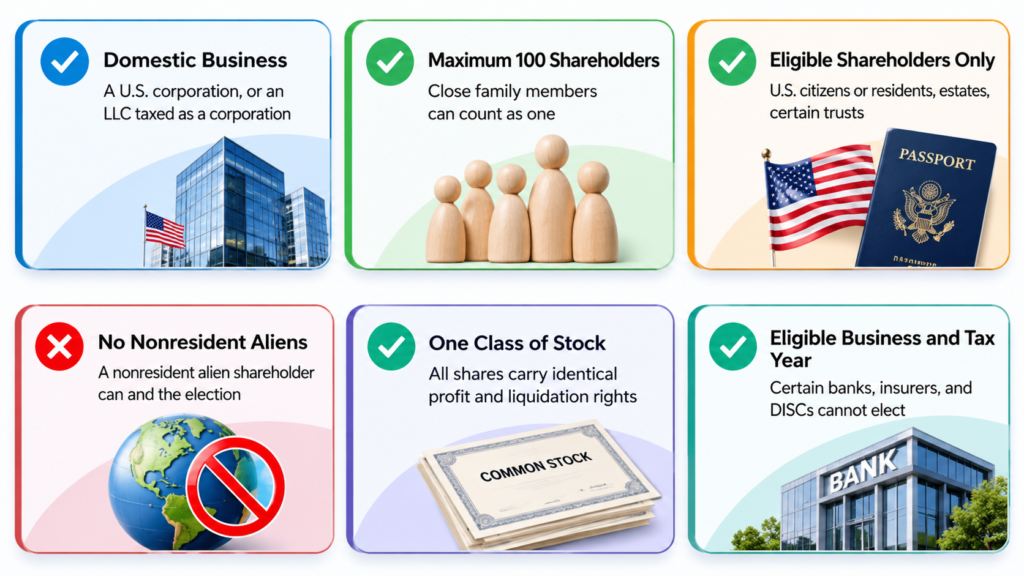
- Domestic Business Requirement:- Only a domestic business can elect S corporation status: a corporation, or an LLC that can be taxed as a corporation, formed under the laws of a U.S. state. A foreign corporation does not qualify.
- Maximum 100 Shareholders:- An S corporation cannot have more than 100 shareholders. Close family members can elect to be counted as one shareholder. If the company passes 100 shareholders, the election ends and C corporation tax rules apply.
- Eligible Shareholder Types:- Shareholders must generally be U.S. citizens or resident individuals, estates, certain trusts, or certain tax-exempt organizations. Partnerships, C corporations, and most other companies cannot own S corporation shares. Check every owner carefully before you file.
- No Nonresident Alien Shareholders:- A nonresident alien cannot own S corporation shares. This matters for NRIs: if you are not a U.S. tax resident, you cannot be a shareholder. A nonresident alien joining later can also end the election.
- One Class of Stock Requirement:- S corporations can have only one class of stock. All shares must carry identical rights to profits and liquidation proceeds. Differences in voting rights are allowed, but unequal distributions can put the election at risk.
- Eligible Business and Tax Year Requirements:- Certain banks, insurance companies, and DISCs cannot elect S corporation status. Most S corporations use a calendar tax year. A fiscal year is possible only with a valid business purpose or a Section 444 election.
When Should You File Form 2553?
- 2 Months and 15 Days Rule:- File Form 2553 no later than 2 months and 15 days after the tax year starts. For a calendar-year business electing for 2027, the deadline is March 15, 2027. Counting begins at the year’s start.
- Filing Form 2553 Before the Tax Year Begins:- You do not have to wait. A corporation can file Form 2553 at any time during the tax year before the year it wants S status. Filing in 2026 for a 2027 election is allowed.
- Election for a Newly Formed Business:- A new business has 2 months and 15 days from its first day with shareholders, assets, or business activity, whichever comes first. If it begins February 1, the deadline is April 15 of that year.
How to Elect S Corporation Status Using Form 2553: Step-by-Step
Step 1: Confirm Your Business Eligibility
Check that your business meets every S corporation rule: domestic entity, no more than 100 shareholders, eligible owners only, and one class of stock. Also confirm the election actually saves money. Our guide on whether an S corporation is worth it helps you decide first.
Step 2: Obtain an Employer Identification Number (EIN)
Form 2553 requires your business’s Employer Identification Number, so get one before you file. Apply free on IRS.gov. Use the EIN of the corporation or LLC itself, not your personal Social Security number. Make sure the legal name on the form matches your state records.
Step 3: Complete Part I of Form 2553
Part I holds the core election details: business name, address, EIN, state and date of incorporation, the effective date, and a contact officer. Fill in every item carefully and completely. Wrong details or blanks are a common reason the IRS delays or rejects an election.
Step 4: Obtain Shareholder Consent and Signatures
Every person who owns stock when you file, and anyone who owned it earlier that year, must consent. Spouses with community property interests must also sign. Each consent needs a signature, date, share count, and tax ID. A missing consent can invalidate the whole election.
Step 5: Complete Additional Parts If Applicable
Most businesses can stop after Part I. Complete Part II only if you want a fiscal tax year, and Part III if a qualified subchapter S trust is a shareholder. Late-election filers must also add the reasonable-cause statement. Skip any part that does not apply.
Step 6: Submit Form 2553 to the IRS
Mail or fax the original signed form to the IRS center listed in the Form 2553 instructions for your business location. The IRS does not accept Form 2553 through online filing. Use certified mail, or keep the fax confirmation, as proof you filed on time.
Step 7: Wait for IRS Confirmation
The IRS usually replies within 60 days, often with a CP261 notice confirming acceptance and your effective date. If you hear nothing after about two months, call the IRS Business and Specialty Tax Line at 800-829-4933. Fiscal-year elections can take longer. Keep the notice permanently.

How to Complete IRS Form 2553
Step 1: Enter the Business Information
Write the corporation’s or LLC’s exact legal name, address, EIN, date of incorporation, and state of incorporation. Add the name, title, and phone number of an officer the IRS can call with questions. Match every detail to your state records.
Step 2: Enter the Desired Effective Date
Enter the date you want S status to begin in line E, usually January 1 for an existing business or the start date for a new one. The filing deadline depends on this date, so double-check it before you sign.
Step 3: Confirm the Tax Year
Most S corporations use a calendar tax year ending December 31. For a different year-end, complete Part II and explain the business purpose, or make a Section 444 election. Decide now, before filing, because changing it later needs IRS approval.
Step 4: Review Shareholder or Owner Consent
Check that every shareholder’s name, address, share count, ownership dates, and tax ID are correct and match your records. Confirm that each person signed and dated the consent statement. A missing consent can invalidate the election, so recheck before sending.
Step 5: Sign and Submit the Form
An authorized officer must sign the form under penalties of perjury, and each shareholder signs the consent. Make a complete copy for your records, then mail or fax the original. Track the date you filed so you can follow up.
What If You Miss the Form 2553 Deadline?
Missing the deadline does not always mean losing S corporation status, but it can delay it by a full year. Here is how it works.
What Happens by Default
A late election usually takes effect from the next tax year, not the year you wanted. Until then, a corporation stays a C corporation, and an LLC keeps its default tax treatment. For example, if you wanted S status from January 1, 2026, the March 2026 deadline has already passed.
Late Election Relief Under Rev. Proc. 2013-30
The IRS offers a simpler relief route if all of these are true:
- You intended to be an S corporation from the effective date on Form 2553.
- The only reason you did not qualify was the late filing.
- You have reasonable cause for filing late, explained in a signed statement.
- The company and every shareholder reported income as if the S election were already in effect.
- You request relief within 3 years and 75 days of the intended effective date.
How to Request Relief
- Complete Form 2553 as usual, including all shareholder consents.
- Write “FILED PURSUANT TO REV. PROC. 2013-30” at the top of the first page.
- Add the reasonable-cause explanation described in the Form 2553 instructions.
- Mail or fax it to the IRS. In some cases, the late election can be attached to Form 1120-S instead, so ask your tax professional which route fits.
If you are outside the 3-year-and-75-day window, the usual remaining option is a private letter ruling from the IRS, which carries a user fee and takes longer. Get professional help before choosing that path.

What to Do After the Election Is Accepted
Approval is not the finish line. An S corporation has ongoing duties, and mistakes here can put your status at risk.
- Save your proof. Keep the CP261 notice and a full copy of the signed Form 2553 in your permanent records.
- Pay yourself a reasonable salary. Owners who work in the business should be paid through payroll, with regular payroll tax deposits and filings. Profit above that can be taken as distributions.
- Keep distributions equal to ownership. Pay distributions in proportion to shares owned, so you do not create a second class of stock.
- File Form 1120-S every year. It is due March 15 for calendar-year companies, and each shareholder receives a Schedule K-1. Our guide on how to file Form 1120-S walks through the full return.
- Check your state rules. Some states need their own S election, charge entity-level tax, or require extra forms.
- Protect your eligibility. Before adding any new owner, confirm they qualify. A nonresident alien, a partnership, or a second class of stock can end the election.
Conclusion
Electing S corporation status is straightforward when you follow the steps in order. Confirm your eligibility, get your EIN, complete Form 2553, collect every shareholder’s consent, and mail or fax it before the deadline. For 2027, calendar-year businesses can file now and must file by March 15, 2027. If you miss the date, late-election relief may save your election. After approval, run payroll and file Form 1120-S every year. If you are unsure about eligibility, timing, or your numbers, a tax professional can review your case before you file. Getting it right the first time avoids months of delay.
Disclaimer
The content published on NriTaxs is intended for informational purposes only and does not constitute legal, tax, or financial advice. Readers are encouraged to consult qualified professionals before making any decisions based on the information provided.






Related Articles