
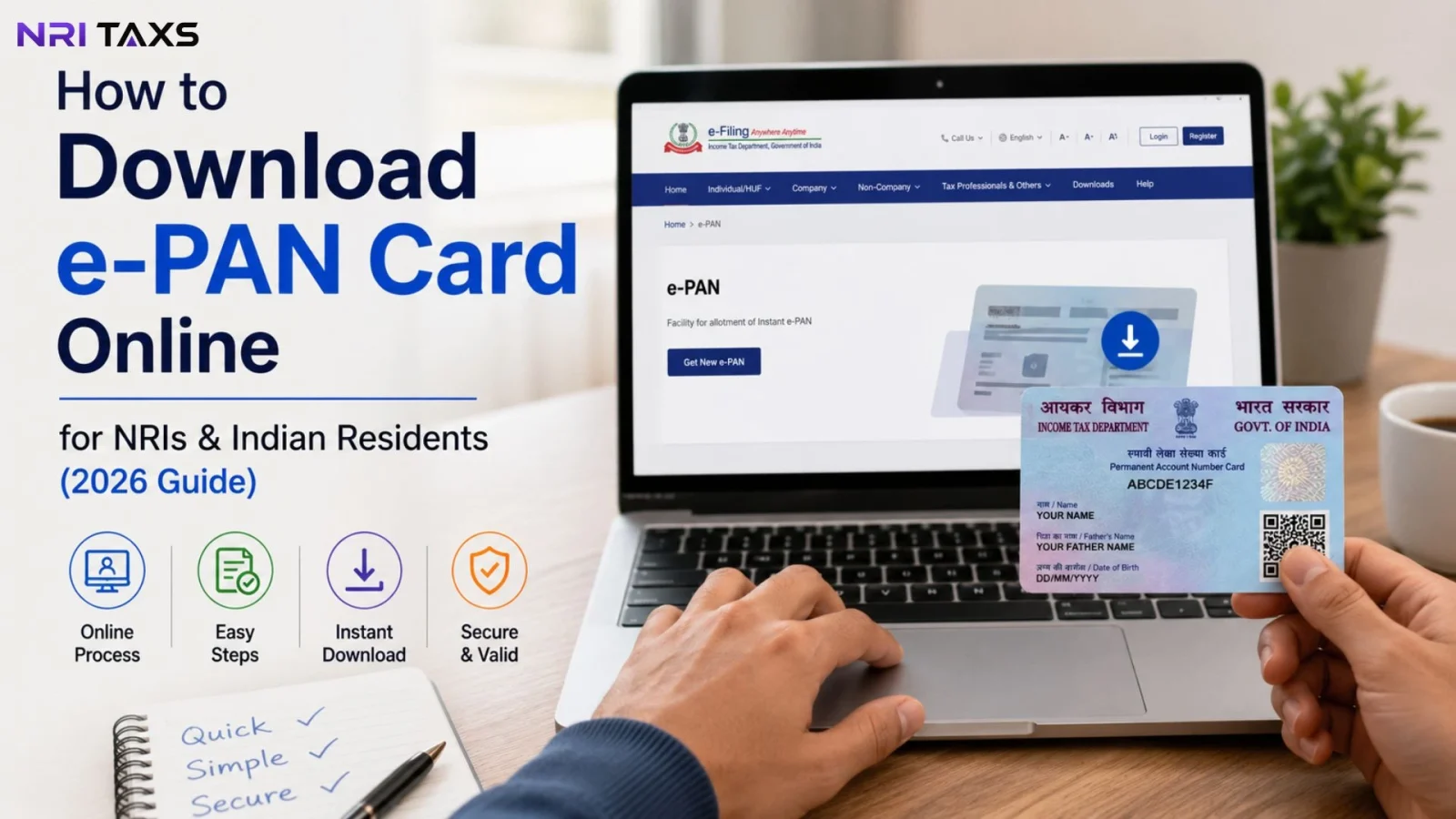
Lost your physical PAN card, or never received it in the first place? You don’t need to wait for a reprint. Your e-PAN can be downloaded online in a few minutes, whether you’re an Indian resident, an NRI, or an OCI cardholder. In this guide, we’ll walk you through the complete process on both the official portals Protean (formerly NSDL) and UTIITSL and cover the exact issues that trip up NRIs and overseas applicants most.
Quick Answer
You can download your e-PAN online through the official Protean or UTIITSL portal by entering your PAN number, date of birth, completing OTP verification, and downloading the password-protected PDF.
What Is an e-PAN Card?
An e-PAN is a digitally signed, password-protected electronic version of your Permanent Account Number card, issued as a PDF file by the Income Tax Department through its authorized agencies. It carries the same legal validity as your physical PAN card and includes a QR code that stores your PAN details securely, along with your photograph and signature. Because it’s a PDF, it can be downloaded, emailed, and stored on your phone or laptop no waiting for postal delivery.
Who Can Download e-PAN Card?
The e-PAN download facility is available to:
- Indian residents who already hold a PAN allotted through Protean or UTIITSL.
- NRIs (Non-Resident Indians) whose PAN was issued using their Indian or foreign address.
- OCI (Overseas Citizen of India) cardholders who have applied for and been allotted a PAN.
- Foreign citizens, where eligible, who hold a PAN issued under Indian tax regulations.
- Anyone whose PAN was allotted or last updated through Protean or UTIITSL this is the one condition that applies across the board, since the download portal you use depends on which agency processed your original PAN application.
If you’re not sure which agency processed your PAN, check your original PAN allotment letter or acknowledgment receipt and it will mention “NSDL” (now Protean) or “UTIITSL.”
Don’t have a PAN yet? Read our complete guide on How NRIs Can Apply for a PAN Card before downloading your e-PAN.
Things You’ll Need Before Downloading e-PAN
Keep this checklist handy before you start:
- PAN Number (or your acknowledgment number, if the PAN was allotted recently)
- Aadhaar Number — required if your PAN is Aadhaar-linked
- Date of Birth (or date of incorporation, for entities) in the exact format on your PAN record
- Registered Mobile Number — must be the number linked to your PAN or Aadhaar
- Registered Email ID — some portals send the download link here instead of, or in addition to, the mobile OTP
- OTP access — you’ll need to be able to receive and enter an OTP in real time, so make sure the registered number/email is actually accessible to you at the time of download
If your mobile number isn’t linked to your PAN or Aadhaar anymore, a common problem for NRIs whose Indian SIM has expired you will need to update it before you can complete the OTP step. If you’re specifically applying from the United Kingdom, check out our detailed guide on how to Apply for an NRI PAN Card from the UK for country-specific requirements, documents, and the complete application process.
How to Download e-PAN Card from Protean (Step-by-Step)
Step 1: Visit the Official Protean e-PAN Portal
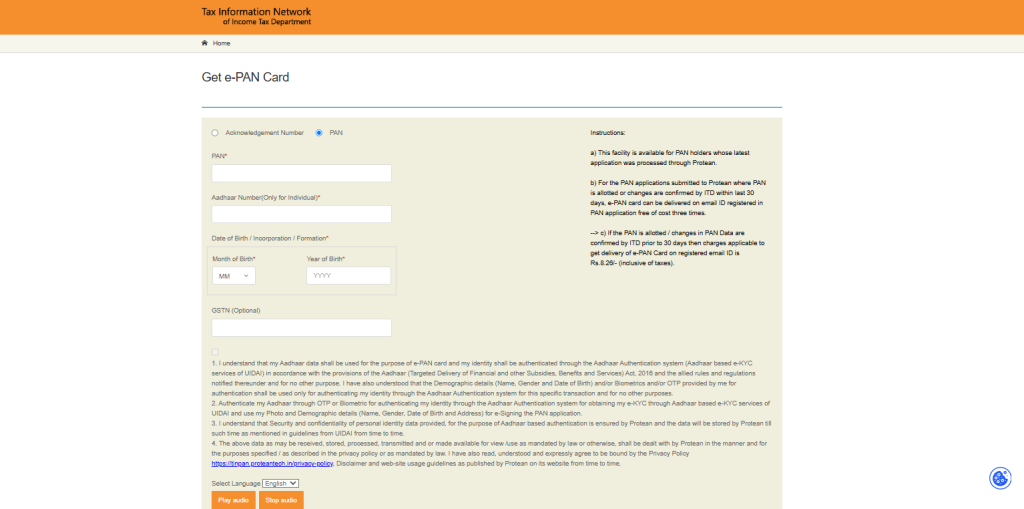
Visit the official Protean e-PAN download page and choose “PAN” or “Acknowledgement Number”, depending on the details you have.
Step 2:Enter Your PAN Details
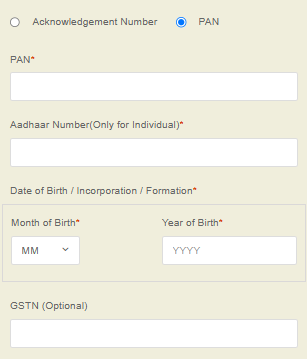
Once you’ve selected PAN or Acknowledgement Number, enter the required details, including your PAN Number, Aadhaar Number (if applicable), Date of Birth, and the captcha code displayed on the screen. Double-check that all the information matches your PAN records before proceeding.
Step 3: Verify Your Identity
After submitting your details, another step to download e-PAN card from Protean is to verify your identity using an OTP (One-Time Password). Choose whether you want to receive the OTP on your registered mobile number, registered email ID, or both (if available). Enter the OTP within the given time to continue.
Step 4: Download Your e-PAN
Once your identity has been successfully verified, your e-PAN will be ready for download. If a nominal download fee applies, complete the payment first; otherwise, simply click the Download e-PAN button and save the PDF to your device.
If you face any issues while filling out the form, completing OTP verification, or downloading your e-PAN, you can seek professional assistance from SaveTaxs to make the process simple, accurate, and hassle-free.
How to Download an e-PAN Card from UTIITSL?
Step 1: Visit the Official UTIITSL e-PAN Portal
Go to the official UTIITSL PAN Services website and click on the “Download e-PAN” option available on the homepage to begin the process.
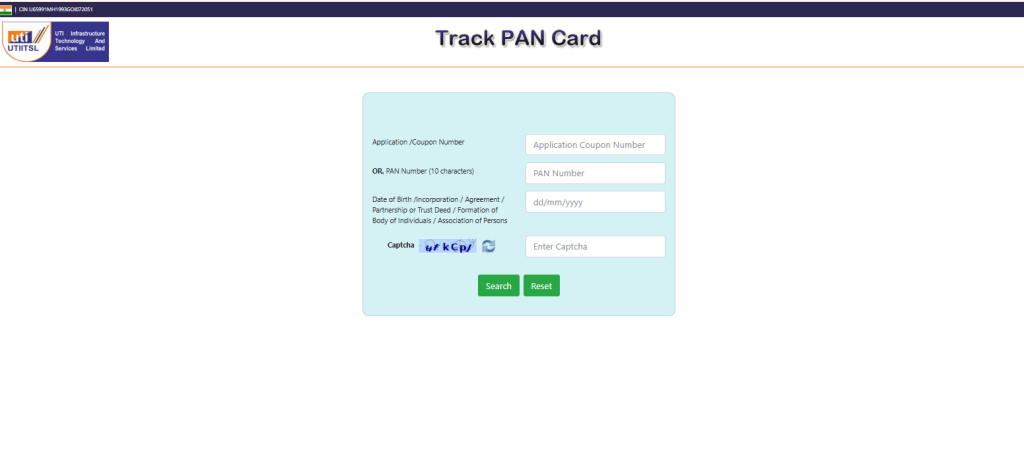
Step 2: Enter Your PAN Details
Enter your PAN Number (or Application/Coupon Number, if available), Date of Birth, and the captcha code displayed on the screen. Double-check that all the details match your PAN records before clicking Search.
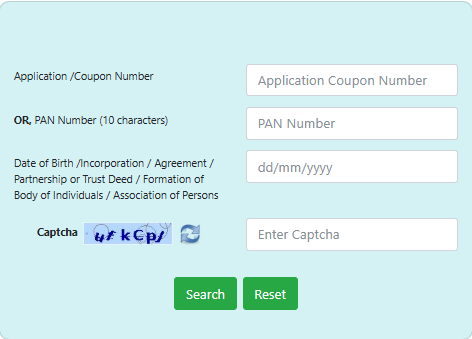
Step 3: Verify Your Identity
After clicking Search, you’ll receive an OTP on your registered mobile number, email ID, or both (depending on the available verification options). Enter the OTP within the validity period to verify your identity and continue.
Step 4: Download Your e-PAN
Once your identity has been verified successfully, your e-PAN will be available for download. If a download fee applies, complete the payment first. After that, download the password-protected PDF and save it securely on your device. Use your Date of Birth (DDMMYYYY) as the password to open the PDF.

Why Can’t You Download Your e-PAN? Common Errors and Fixes
This is where most people get stuck and it’s the part most guides skip over. Here’s what usually goes wrong and how to fix it:
| Problem | Likely Cause | Solution |
| OTP not received | Mobile number not linked to PAN/Aadhaar, or number is inactive. | Update your mobile number with UIDAI or through PAN correction before retrying. |
| “Invalid Date of Birth” error | DOB entered doesn’t match Income Tax records exactly. | Re-check the DOB format and match it against your original PAN application. |
| “PAN not found” or inactive | PAN may be deactivated, duplicate, or not yet processed by ITD. | Check PAN status on the Income Tax e-filing portal; raise a grievance if it shows inactive incorrectly. |
| Download not available | PAN was allotted very recently and hasn’t been confirmed by ITD. | Wait 24–48 hours after allotment confirmation before retrying. |
| Email mismatch | Registered email ID differs from the one you’re using to verify. | Use the exact email on file, or submit a PAN correction request to update it. |
| OTP verification keeps failing | Session timeout, entering OTP too late, or wrong OTP mode selected. | Request a fresh OTP and enter it within the validity window (usually 10 minutes). |
If none of these apply and the issue persists, it’s worth checking your PAN status directly and, if needed, contacting Protean or UTIITSL support before attempting further downloads repeated failed attempts can sometimes lock the request temporarily.
Is e-PAN Valid Everywhere?
Yes. An e-PAN carries the same legal standing as a physical PAN card and is accepted as valid proof of PAN across:
- Banks — account opening, KYC updates, and high-value transactions
- Passport applications — PAN is often required as a supporting identity/financial document
- Income Tax filings — for e-filing returns, verifying refunds, and linking with Aadhaar
- KYC processes — for mutual funds, demat accounts, and other regulated financial services
- Investments — stock trading accounts, mutual fund folios, and insurance policies
- Property Transactions – A PAN is generally required for buying or selling property in India and for complying with applicable tax regulations.
Planning to sell property in India? Read our guide on Can an NRI Sell Property in India Without Aadhaar or PAN
e-PAN vs Physical PAN Card
| Feature | ? e-PAN | ? Physical PAN Card |
| Format | Digital PDF | Laminated plastic card |
| Delivery Time | Instant to a few minutes | 15–20 working days by post |
| Legal Validity | Same as physical PAN | Same as e-PAN |
| Cost | Free within 30 days of allotment; small fee after | Reprint fee applies (higher for foreign addresses) |
| Best For | Immediate use, digital KYC, NRIs abroad | Physical verification, in-person KYC |
| Storage | Cloud/device storage, easily shareable | Can be lost, damaged, or misplaced |
For most day-to-day and digital purposes, the e-PAN is now the more practical option especially if you’re outside India and can’t wait for postal delivery.
Can NRIs Download e-PAN Card?
Yes — and this is where NRIs and OCI holders run into problems that most guides don’t address. Here’s what to know:
NRIs: If your PAN was issued with an Indian address, you can generally download it the same way as a resident, provided your mobile number and email are still active and correctly linked. If your PAN has a foreign address on file, make sure that address matches what’s registered — mismatches here are a common reason downloads fail.
OCI Cardholders: The download process is identical, but many OCI holders no longer have an active Indian mobile number linked to their PAN or Aadhaar. Without a working OTP channel, the download will not go through, so this is usually the first thing to fix.
Foreign Address Issues: If your registered address abroad has changed since your PAN was issued, this doesn’t block the e-PAN download itself, but it can cause verification mismatches on some portals. If you hit repeated errors, a PAN correction request to update your address is often the fastest fix. If you’ve recently become a foreign citizen or your citizenship details have changed, make sure your PAN records are updated. Follow our guide on How to Update Citizenship Status in PAN Card for NRIs to avoid KYC and verification issues while downloading or using your e-PAN.
Mobile Number Issues: This is, by far, the most common blocker for NRIs. If your Indian number is no longer active, you’ll need to either update your mobile number through Aadhaar (if you can visit an enrolment centre or use NRI-specific Aadhaar update channels) or rely on the email OTP option, where available, instead of mobile.
OTP Issues While Abroad: International SMS delivery for OTPs can occasionally be delayed or blocked by local carriers. If mobile OTP isn’t arriving, switch to the email verification option on the same portal instead of repeatedly requesting mobile OTPs, which can trigger a temporary lock.
For NRIs: your download will almost always fail not because of PAN eligibility, but because of an outdated mobile number, email mismatch, or address inconsistency. Fixing these first saves a lot of back-and-forth.
Concluison
Downloading your e-PAN card is a quick and convenient process, whether you’re an Indian resident, an NRI, or an OCI cardholder. Once you know which portal Protean or UTIITSL processed your PAN application, you can complete the download in just a few minutes by following the correct steps and verifying your details.
If you encounter issues such as OTP verification failures, incorrect PAN details, or problems accessing your e-PAN, it’s important to resolve them before making multiple download attempts. Keeping your e-PAN readily available can save time when completing KYC, filing income tax returns, opening bank accounts, or carrying out other financial transactions in India.
For applicants who need help with PAN applications, e-PAN downloads, PAN corrections, or other PAN-related services, professional assistance can make the process faster, simpler, and stress-free.
Disclaimer
The content published on NriTaxs is intended for informational purposes only and does not constitute legal, tax, or financial advice. Readers are encouraged to consult qualified professionals before making any decisions based on the information provided.


Related Articles